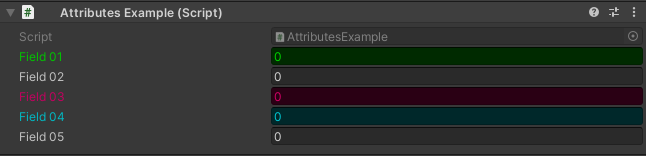
ColorField Attribute
Warning
This attribute has been deprecated, use GUIColor Attribute instead
Note
Because UI toolkit makes tinting elements very difficult, it’s not possible to properly tint properties with ColorField, this attribute will stay deprecated until Unity adds an easyer way of tinting elements. Which I estimate it will be in about 234287346598175492164 years. If you think this attribute would work well enough for you, feel free to uncomment all the code in ColorFieldDrawer.cs
Attribute to color a field in the inspector
- Parameters:
floatred: Red amountfloatgreen: Green amountfloatblue: Blue amountstringhexColor: The color in hexadecimalGUIColorcolor: The color of the field
Unlike the GUIColor Attribute the ColorField Attribute only colors the field is attached to and overrides the GUIColor Attribute:
using UnityEngine;
using EditorAttributes;

public class AttributesExample : MonoBehaviour
{
        [SerializeField, ColorField(GUIColor.Green)] private int field01;
        [SerializeField] private int field02;
        [SerializeField, ColorField(255f, 0f, 123f)] private int field03;
        [SerializeField, ColorField("#00f2ff")] private int field04;
        [SerializeField] private int field05;
}