Rename Attribute
Attribute to rename a field in the inspector
- Parameters:
stringname: The new name of the fieldoptional,
CaseTypecaseType: In what case to rename the fieldoptional,
StringInputModestringInputMode: Set if the string input is set trough a constant or dynamically trough another member
Example:
using UnityEngine;
using EditorAttributes;

public class AttributesExample : MonoBehaviour
{
        [SerializeField] private int intField;
        [Space]
        [SerializeField, Rename("Int Field")] private int secondIntField;
}
Usefull for when you want two or more fields to have the same name in the inspector.

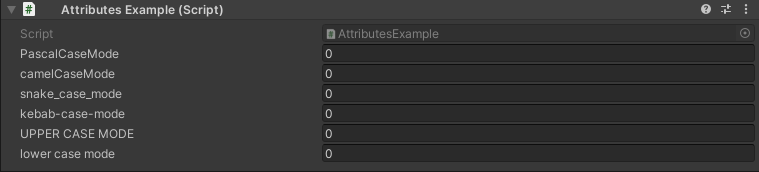
You can also apply different case types to the name like so:
using UnityEngine;
using EditorAttributes;

public class AttributesExample : MonoBehaviour
{
        [SerializeField, Rename("pascal case mode", CaseType.Pascal)] private int intField1;
        [SerializeField, Rename("Camel Case mode", CaseType.Camel)] private int intField2;
        [SerializeField, Rename("snake case mode", CaseType.Snake)] private int intField3;
        [SerializeField, Rename("kebab case mode", CaseType.Kebab)] private int intField4;
        [SerializeField, Rename("upper case mode", CaseType.Upper)] private int intField5;
        [SerializeField, Rename("LOWER CASE MODE", CaseType.Lower)] private int intField6;
}
You can dynamically change the label by setting the stringInputMode parameter to dynamic and specify a member name in the string parameter to get the string value from:
using UnityEngine;
using EditorAttributes;

public class AttributesExample : MonoBehaviour
{
        [Rename(nameof(stringField), stringInputMode: StringInputMode.Dynamic)]
        [SerializeField] private string stringField;
}
