Title Attribute
Attribute to draw a fully customizable header
- Parameters:
stringtitle: The text of the titleoptional,
inttitleSize: The size of the title fontoptional,
booldrawLine: Draw a line under the titleoptional,
floatlineThickness: The thickness of the line in pixelsoptional,
floattitleSpace: The space between the title and fieldoptional,
TextAnchoralignment: The alignment of the titleoptional,
StringInputModestringInputMode: Set if the string input is set trough a constant or dynamically trough another member
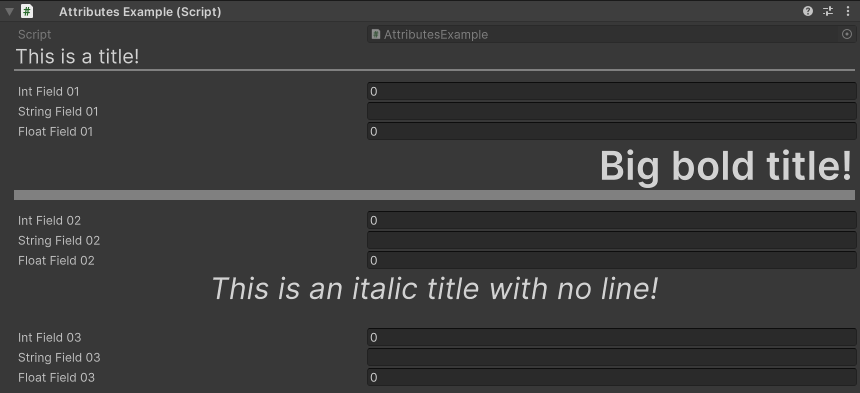
You can further customize titles with rich text support:
using UnityEngine;
using EditorAttributes;

public class AttributesExample : MonoBehaviour
{
        [Title("This is a title!")]
        [SerializeField] private int intField01;
        [SerializeField] private string stringField01;
        [SerializeField] private float floatField01;

        [Title("<b>Big bold title!</b>", 40, lineThickness: 10f, alignment: TextAnchor.MiddleRight)]
        [SerializeField] private int intField02;
        [SerializeField] private string stringField02;
        [SerializeField] private float floatField02;

        [Title("<i>This is an italic title with no line!</i>", 30, 20f, false, alignment: TextAnchor.MiddleCenter)]
        [SerializeField] private int intField03;
        [SerializeField] private string stringField03;
        [SerializeField] private float floatField03;
}
You can dynamically change the title by settings the stringInputMode parameter to dynamic and specify a member name in the string parameter to get the string value from:
using UnityEngine;
using EditorAttributes;

public class AttributesExample : MonoBehaviour
{
        [Title(nameof(DynamicTitle), stringInputMode: StringInputMode.Dynamic)]
        [SerializeField] private int intField;

        public string DynamicTitle => $"The int value is: {intField}";
}
