Required Attribute
Attribute that validates a null field in the inspector.
- Parameters:
stringcustomFixFunctionName: The name of the custom function to run by the Fix buttonoptional,
boolthrowValidationError: Throws an error in the console if validation failsoptional,
boolbuildKiller: Throws an error during build time and cancels it if validation failsoptional,
ReferenceFixModefixMode: Specifies how the field should be auto-referenced by the Fix button
Example:
using UnityEngine;
using EditorAttributes;

public class AttributesExample : MonoBehaviour
{
        [SerializeField, Required] private GameObject objectField;
}

If you want to include a required field in the validation process set throwValidationError to true:
using UnityEngine;
using EditorAttributes;

public class AttributesExample : MonoBehaviour
{
        [SerializeField, Required(true)] private GameObject objectField;
        [SerializeField, Required(true, true)] private GameObject objectFieldBuildKiller;
}
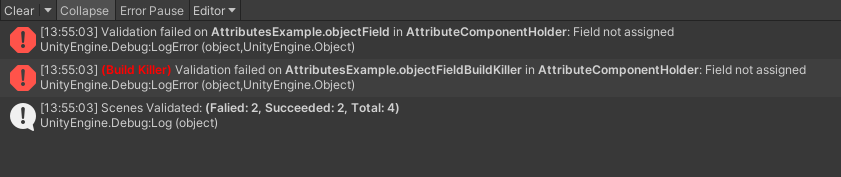
For more details on validation see the Validate Attribute.
You can have the required field be auto-referenced by setting the fixMode parameter to one of the defined values:
using UnityEngine;
using EditorAttributes;

public class AttributesExample : MonoBehaviour
{
        [SerializeField, Required(fixMode: ReferenceFixMode.Auto)] private BoxCollider colliderField;
}
Now a small “Fix” button will show up on the help box and pressing it will assign the field if there is a valid reference found.

You can choose one of the following options to specify how the reference will be fixed:
ReferenceFixMode.None: Auto-referencing is disabled and the “Fix” button will be hidden. This is default behaviour.ReferenceFixMode.Auto: Attempts to grab a reference from Self -> Children -> Parents -> Scene in that order until a reference is found.ReferenceFixMode.Self: Attempts to grab a reference from itself.ReferenceFixMode.Children: Attempts to grab a reference from it’s children.ReferenceFixMode.Parents: Attempts to grab a reference from it’s parents.ReferenceFixMode.Scene: Attempts to grab a reference from the first loaded object in the scene that matches the field type.ReferenceFixMode.Custom: A custom function will be used to auto-reference the field. This is set by default when using the constructor with the customFixFunctionName parameter.
If the reference you want to assign requires additional logic you can create a custom function returning an UnityEngine.Object to be called by the “Fix” button.
This is usefull in scenarios where you want to assign a loaded asset:
using UnityEngine;
using EditorAttributes;

public class AttributesExample : MonoBehaviour
{
        [SerializeField, Required(nameof(GetFieldReference))] private Material materialField;

        private Object GetFieldReference() => Resources.Load("ExampleMaterial");
}

This is also the only valid way to add auto-referencing for fields that are part of an asset (ex. ScriptableObjects).