Dropdown Attribute
Attribute to make a dropdown menu out of a collection of elements.
- Parameters:
stringvalueCollectionName: The name of the collection for the values set by the dropdownstring[]displayNames: Change the display name for each item inside the dropdown
Example:
using UnityEngine;
using EditorAttributes;

public class AttributesExample : MonoBehaviour
{
        [SerializeField, Dropdown(nameof(dropdownValues))] private string stringDropdown;

        private string[] dropdownValues = new string[]
        {
                "Value01", "Value02", "Value03"
        };
}
Now you can specify the value of the string from a dropdown.

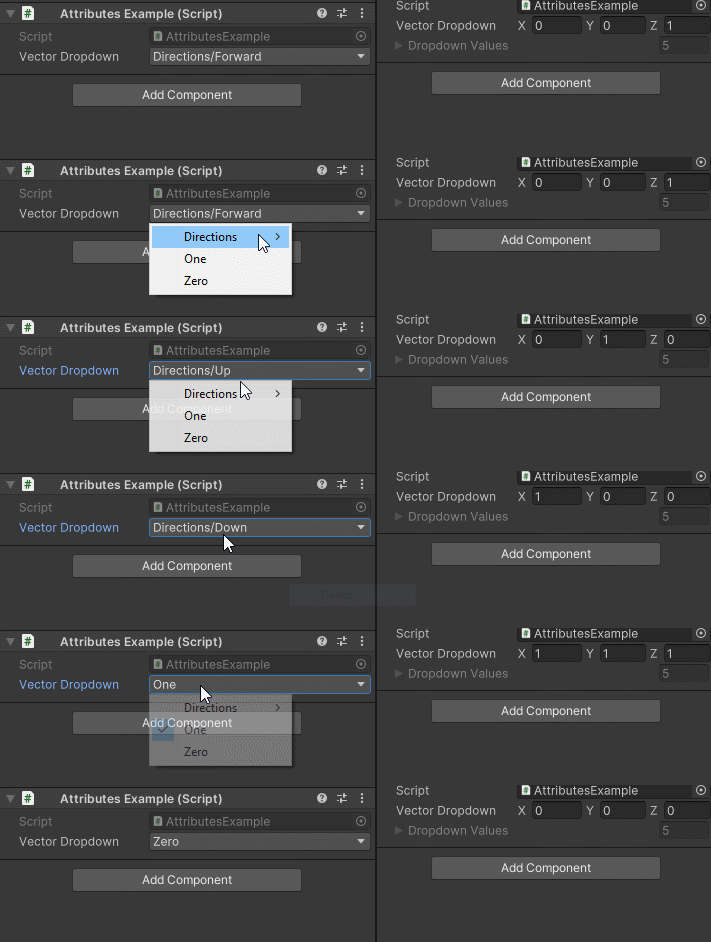
You can also customize how to display dropdown values by passing a string array like this:
using UnityEngine;
using EditorAttributes;

public class AttributesExample : MonoBehaviour
{
        [Dropdown(nameof(dropdownValues), new string[] { "Directions/Forward", "Directions/Up", "Directions/Down", "One", "Zero" })]
        [SerializeField] private Vector3 vectorDropdown;

        private Vector3[] dropdownValues = new Vector3[]
        {
                Vector3.forward, Vector3.up, Vector3.down, Vector3.one, Vector3.zero
        };
}
Or alternatively use a Dictionary where the keys will be used for display:
using UnityEngine;
using EditorAttributes;
using System.Collections.Generic;

public class AttributesExample : MonoBehaviour
{
        [Dropdown(nameof(dropdownValues))]
        [SerializeField] private Vector3 vectorDropdown;

        private Dictionary<string, Vector3> dropdownValues = new()
        {
                { "Directions/Forward", Vector3.forward },
                { "Directions/Up", Vector3.up },
                { "Directions/Down", Vector3.down },
                { "One", Vector3.one },
                { "Zero", Vector3.zero }
        };
}
Note
If you try to use both a Dictionary and a string array with the attribute, the array will take priority for the displayed values.