UnitField Attribute
Attribute to display a numerical field as a specified unit and convert it to another unit
- Parameters:
UnitdisplayUnit: The unit to display in the inspectorUnitconversionUnit: The unit to convert tostringcustomDisplayUnit: The custom unit to display in the inspectorstringcustomConversionUnit: The custom unit to convert to
Example:
using UnityEngine;
using EditorAttributes;

public class AttributesExample : MonoBehaviour
{
        [SerializeField, UnitField(Unit.Year, Unit.Day)] private int intField;
        [SerializeField, UnitField(Unit.Day, Unit.Second)] private float floatField;
}

We can see the converted values in the debug view.

You can define custom units in the EditorAttributes Settings and use them by passing them as a string in the attribute like this.
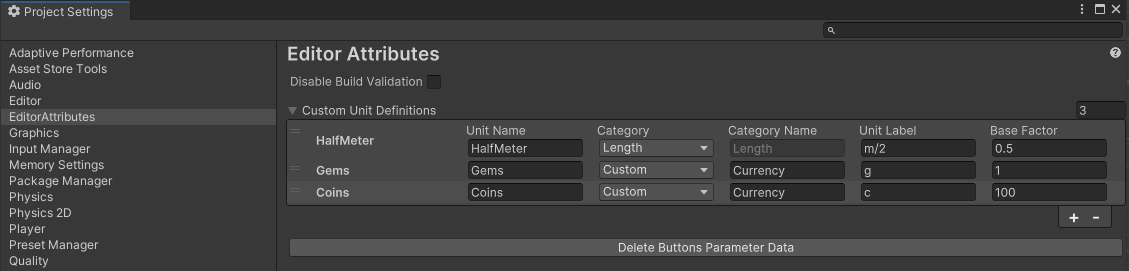
First we go Edit/ProjectSettings/EditorAttributes and add a new entry in the Custom Unit Definitions array and fill the data accordingly.
The unit name will be used to identify the unit by the attribute. Be careful with white spaces or weird casing.
You can either make your unit part of an existing category or create a custom category, you can only make conversions with units part of the same category.
If you chose to create a custom category you can name your new category. Be careful with white spaces or weird casing here as well.
The unit label will be used for displaying the unit in the field, so you can define your unit’s symbol here.
Base factor represents how much of the base unit is equal to 1 of this unit. If you create a new category you will need a base unit set to 1 that all conversions will be based on.
In the example I added 3 units:
HalfMeter adds another unit to the Length category and it represents half of 1 meter. The base unit for the length category is the meter so 1 half meter is 0.5 meters
Gems is the base unit of a new category called Currency so we set the base factor to 1.
Coins is another unit part of the Currency category. 1 coin is equivalent to 0.01 gems so 100 coins is equal to 1 gem.
Now we pass the unit name of our custom defined unit in the attribute:
using UnityEngine;
using EditorAttributes;

public class AttributesExample : MonoBehaviour
{
        [SerializeField, UnitField("HalfMeter", Unit.Meter)] private float meters;
        [SerializeField, UnitField("Coins", "Gems")] private int gems;
}

We can see the converted values in the debug view.

Here is a list of every base unit in the built-in categories:
Time: Second
Lenght: Meter
Mass: Gram
Volume: Liter
Area: Square Meter
Angle: Radian
Speed: Meters Per Second
Energy: Joule
Power: Watt
Pressure: Pascal
Electric Current: Ampere
Voltage: Volt
Resistance: Ohm
Capacitance: Farad
Inductance: Henry
Frequency: Hertz
Data: Byte
Density: Kilogram Per Cubic meter
Fuel Economy: MilesPerGallon_US
Percentage: Percent Multiplier